Importing python libraries
import time
import numpy as np
import pandas as pd
import matplotlib.pyplot as plt
First step is to import the Tobii Pro SDK as a python library.
To install the python library, use the following command line on your command prompt.python -m pip install tobii_research
However, make sure that your python version is 3.10.x. In this document, python version of 3.10.18 was used.
import tobii_research as tr
Identify connected eye trackers
Once the Tobii Pro SDK python library has imported, we first need to identify connected eye trackers.
We can do that by using the following function provided in the python library.tobii_research.find_all_eyetrackers()
In the following code, the find_all_eyetrackers() function has used to identify connected eye trackers.
Additionally, a simple if, else if logic has been added to deal with situations where we have two eye trackers.
Also, note that tobii_research package has been referred as tr instead of its full package name.
found_eyetrackers = tr.find_all_eyetrackers()

if len(found_eyetrackers) == 1:
    eyetracker = found_eyetrackers[0]
elif len(found_eyetrackers) == 2:
    eyetracker1 = found_eyetrackers[0]
    eyetracker2 = found_eyetrackers[1]
Once we have the eye tracker as a python object(s), we can get more information about the eye tracker as python attributes.
For instance, we can get details like device name, serial number, frequency, and so on.
In the following code, the defailed information are printed out.
print(f"The connected eye tracker is {eyetracker.model}.")
print(f"Serial number: {eyetracker.serial_number}.")
print(f"This eye tracker can collect {eyetracker.get_gaze_output_frequency()} gaze sample per second.")
The connected eye tracker is Tobii Pro Spark.
Serial number: TPE01-100204007303.
This eye tracker can collect 60.0 gaze sample per second.
Connect to eye tracker and collect gaze data
To collect gaze data, we first need to define a callback funtion, which is to tell the eye tracker how we want to organize the gaze data.
Then, we connect (i.e. subscribe) to the eye tracker with the predefined callback function.
Callback function for organizing data
We're going to define a simple callback function, which is just adding the gaze data into a python list.
Afterwise, we'll iterate over the list to extract relevant information and save them as a dataframe.
gaze_data_list = []                 # Initiating an empty list to save the gaze data.

def gaze_data_callback(data):
    gaze_data_list.append(data)     # Append the gaze data into the list.
Connect and collect gaze data
If we run the following code, the eye tracker will start collecting gaze data.
During the process, the gaze data will be saved into the list that we defined in the callback function.
eyetracker.subscribe_to(tr.EYETRACKER_GAZE_DATA, gaze_data_callback)
Stop data collection and disconnect from eye tracker
Run the following code to stop the data collection and disconnect (i.e. unsubscribe/turn off) the eye tracker.
eyetracker.unsubscribe_from(tr.EYETRACKER_GAZE_DATA)
Checking the data
Now, let's take a look at the collected gaze data.
First, we can get a quick overview of the data as below.
gaze_sample_number = len(gaze_data_list)
frequency = eyetracker.get_gaze_output_frequency()

left_gaze_x = gaze_data_list[2].left_eye.gaze_point.position_on_display_area[0]
left_gaze_y = gaze_data_list[2].left_eye.gaze_point.position_on_display_area[1]

right_gaze_x = gaze_data_list[2].right_eye.gaze_point.position_on_display_area[0]
right_gaze_y = gaze_data_list[2].right_eye.gaze_point.position_on_display_area[1]

print(f"Total of {gaze_sample_number} gaze samples were collected using the eye tracker.")
print(f"The data were collected for approximately {round(gaze_sample_number / frequency, 2)} seconds, since the eye tracker is collecting {frequency} gaze samples per second.\n")

print(f"Additionally, we can get normalized coordinates of individual eye's gaze point on the display.")
print(f"For instance, the user was looking at ({round(left_gaze_x, 2)}, {round(left_gaze_y, 2)}) with his/her left eye at the beginning of the data collection.")
print(f"Similarly, the user was looking at ({round(right_gaze_x, 2)}, {round(right_gaze_y, 2)}) with his/her right eye at the beginning of the data collection.\n")

print("And we can average the coordinates of individual gaze points to get a single gaze point on a display.")
print(f"The user was looking at ({round((left_gaze_x + right_gaze_x)/2, 2)}, {round((left_gaze_y + right_gaze_y)/2, 2)}) on the display at the beginning of the data collection.")
Total of 235 gaze samples were collected using the eye tracker.
The data were collected for approximately 3.92 seconds, since the eye tracker is collecting 60.0 gaze samples per second.

Additionally, we can get normalized coordinates of individual eye's gaze point on the display.
For instance, the user was looking at (0.36, 0.66) with his/her left eye at the beginning of the data collection.
Similarly, the user was looking at (0.43, 0.66) with his/her right eye at the beginning of the data collection.

And we can average the coordinates of individual gaze points to get a single gaze point on a display.
The user was looking at (0.4, 0.66) on the display at the beginning of the data collection.
Then, we can iterate over the list that we used in the callback function to get more detailed information.
gaze_data_output = pd.DataFrame(columns=['time', 'left_gaze_x', 'left_gaze_y', 'right_gaze_x', 'right_gaze_y'])

start_time = gaze_data_list[0].device_time_stamp

for data_sample in gaze_data_list:

    current_time = round((data_sample.device_time_stamp - start_time) / 1000000, 2)

    left_gaze_x = data_sample.left_eye.gaze_point.position_on_display_area[0]
    left_gaze_y = data_sample.left_eye.gaze_point.position_on_display_area[1]

    right_gaze_x = data_sample.right_eye.gaze_point.position_on_display_area[0]
    right_gaze_y = data_sample.right_eye.gaze_point.position_on_display_area[1]

    gaze_x = (left_gaze_x + right_gaze_x) / 2
    gaze_y = (left_gaze_y + right_gaze_y) / 2

    data_line = {
        'time': current_time,
        'left_gaze_x': round(left_gaze_x, 3),
        'left_gaze_y': round(left_gaze_y, 3),
        'right_gaze_x': round(right_gaze_x, 3),
        'right_gaze_y': round(right_gaze_y, 3),
        'average_gaze_x': round(gaze_x, 3),
        'average_gaze_y': round(gaze_y, 3)
    }

    gaze_data_output = pd.concat([gaze_data_output, pd.DataFrame([data_line])], ignore_index=True)

gaze_data_output
C:\Users\juneh\AppData\Local\Temp\ipykernel_7172\328049582.py:28: FutureWarning: The behavior of DataFrame concatenation with empty or all-NA entries is deprecated. In a future version, this will no longer exclude empty or all-NA columns when determining the result dtypes. To retain the old behavior, exclude the relevant entries before the concat operation.
  gaze_data_output = pd.concat([gaze_data_output, pd.DataFrame([data_line])], ignore_index=True)
| time | left_gaze_x | left_gaze_y | right_gaze_x | right_gaze_y | average_gaze_x | average_gaze_y | |
|---|---|---|---|---|---|---|---|
| 0 | 0.00 | NaN | NaN | NaN | NaN | NaN | NaN |
| 1 | 0.03 | NaN | NaN | NaN | NaN | NaN | NaN |
| 2 | 0.05 | 0.358 | 0.657 | 0.434 | 0.662 | 0.396 | 0.660 |
| 3 | 0.06 | 0.349 | 0.628 | 0.415 | 0.635 | 0.382 | 0.631 |
| 4 | 0.08 | 0.332 | 0.489 | 0.419 | 0.522 | 0.375 | 0.505 |
| ... | ... | ... | ... | ... | ... | ... | ... |
| 230 | 3.84 | 0.296 | 0.421 | 0.392 | 0.437 | 0.344 | 0.429 |
| 231 | 3.86 | 0.292 | 0.416 | 0.387 | 0.437 | 0.339 | 0.426 |
| 232 | 3.88 | 0.291 | 0.411 | 0.383 | 0.440 | 0.337 | 0.425 |
| 233 | 3.89 | 0.293 | 0.418 | 0.383 | 0.439 | 0.338 | 0.428 |
| 234 | 3.91 | 0.295 | 0.409 | 0.385 | 0.441 | 0.340 | 0.425 |
235 rows × 7 columns
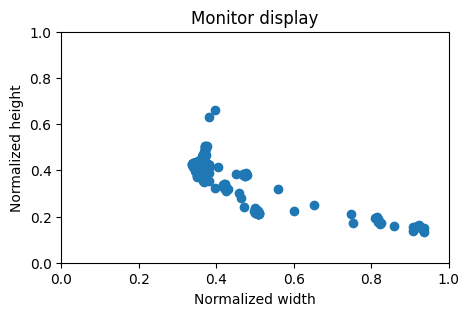
fig, ax = plt.subplots(figsize=(5, 3))

ax.scatter(gaze_data_output['average_gaze_x'], gaze_data_output['average_gaze_y'])

ax.set_xlim(0, 1)
ax.set_ylim(0, 1)
ax.set_title('Monitor display')
ax.set_xlabel('Normalized width')
ax.set_ylabel('Normalized height')

plt.show()
Demonstration
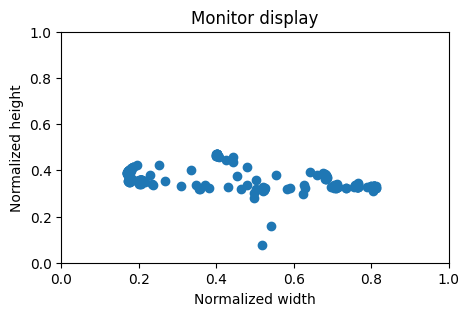
Let's write a short python script using the codes described above to collect gaze data for 5 seconds, save the data, and plot the gaze samples.
# Importing the python library.
import tobii_research as tr

# Identifying connected eye tracker(s).
found_eyetrackers = tr.find_all_eyetrackers()

if len(found_eyetrackers) == 1:
    eyetracker = found_eyetrackers[0]
elif len(found_eyetrackers) == 2:
    eyetracker1 = found_eyetrackers[0]
    eyetracker2 = found_eyetrackers[1]

# Report the detected eye tracker.
print(f"{eyetracker.model} ({eyetracker.serial_number}) has been detected.")

# Define a callback function to save the gaze sample data.
gaze_data_list = []                 # Initiating an empty list to save the gaze data.

def gaze_data_callback(data):
    gaze_data_list.append(data)

# Connect to the eye tracker and collect data.
eyetracker.subscribe_to(tr.EYETRACKER_GAZE_DATA, gaze_data_callback)

# Collecting data for 5 seconds.
time.sleep(5)

# Stop the data collection and disconnect from the eye tracker.
eyetracker.unsubscribe_from(tr.EYETRACKER_GAZE_DATA)

# Initiate an empty dataframe to save all the gaze samples.
gaze_data_output = pd.DataFrame()

# Configuring the start time to calculate the relative time throughout the data collection.
start_time = gaze_data_list[0].device_time_stamp

# Iterate over the gaze data saved in the list to extract the relevant information and save them into a dataframe.
for data_sample in gaze_data_list:

    current_time = round((data_sample.device_time_stamp - start_time) / 1000000, 2)

    left_gaze_x = data_sample.left_eye.gaze_point.position_on_display_area[0]
    left_gaze_y = data_sample.left_eye.gaze_point.position_on_display_area[1]

    right_gaze_x = data_sample.right_eye.gaze_point.position_on_display_area[0]
    right_gaze_y = data_sample.right_eye.gaze_point.position_on_display_area[1]

    gaze_x = (left_gaze_x + right_gaze_x) / 2
    gaze_y = (left_gaze_y + right_gaze_y) / 2

    data_line = {
        'time': current_time,
        'left_gaze_x': round(left_gaze_x, 3),
        'left_gaze_y': round(left_gaze_y, 3),
        'right_gaze_x': round(right_gaze_x, 3),
        'right_gaze_y': round(right_gaze_y, 3),
        'average_gaze_x': round(gaze_x, 3),
        'average_gaze_y': round(gaze_y, 3)
    }

    gaze_data_output = pd.concat([gaze_data_output, pd.DataFrame([data_line])], ignore_index=True)

# Visualizing the collected gaze samples on a normalized monitor display.
fig, ax = plt.subplots(figsize=(5, 3))

ax.scatter(gaze_data_output['average_gaze_x'], gaze_data_output['average_gaze_y'])

ax.set_xlim(0, 1)
ax.set_ylim(0, 1)
ax.set_title('Monitor display')
ax.set_xlabel('Normalized width')
ax.set_ylabel('Normalized height')

plt.show()

# Saving the dataframe and figure.
plt.savefig('gaze_point_display.png', dpi=200)
gaze_data_output.to_csv('gaze_sample_data.csv', index=False)
Tobii Pro Spark (TPE01-100204007303) has been detected.
<Figure size 640x480 with 0 Axes>